AFKIM 2
April 10, 2006 on 8:49 pm | In Uncategorized |It is finally released, days or hours late, as per usual.
Changelog stuff:
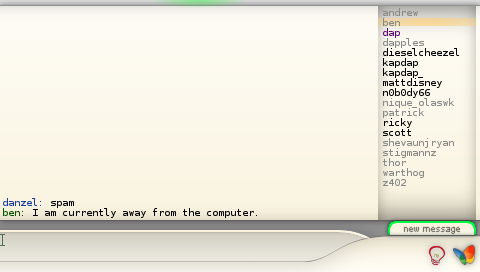
New Graphics, complete new style ![]()
New keyboard (danzeff, see danzeff.txt for usage information)
You can rename contacts.
Less crashes! (maybe! lol)
Works on the new eloader!
Contact list scrolls automatically.
New msg popup.
When logging into wifi/bitlbee there is more feedback
READ THE README BEFORE INSTALLING!
(It’ll answer most of your questions)
Also, read the FAQ / TODO list here
Downloads:
psp 1.00 and 2.00+ version
psp 1.5 version
Enjoy
And while we’re at it, here is a fixed webnab for 2.00+, you can quit by pressing the select button (L+R+Start makes it crash)
get it here
I’ve got a paypal account up if you want to show your appreciation in the form of dollar signs
85 Comments »
RSS feed for comments on this post. TrackBack URI
Leave a comment
Powered by WordPress with Pool theme design by Borja Fernandez.
Entries and comments feeds.
Valid XHTML and CSS. ^Top^
u roxes danzel, keep up the good work, i’m going to test this now ( i didn’t mind the previous keyboard, effort required to adapt… i’ll see how this new one is )
Comment by Diurn — April 11, 2006 #
hey..i downloaded your messenger but..it doesnt work..my firmware is version 2.60…and it says “cannot open file data is corrupted”…
Comment by jerik — April 11, 2006 #
Well done on this iam putting it on my psp right now.
Comment by Brian — April 11, 2006 #
Hey - Great work! I’ll use it when I’m on the crapper
Anyway, I see you have some strange hosting. If you’d like a free subdomain on tehskeen.com with enough bandwidth to keep you happy drop me a line. Peace out!
Comment by brakken — April 11, 2006 #
hey can u help me out with 2.6 support??? says data is corrupt???
Comment by kyle — April 11, 2006 #
Diurn - You can turn the old keyboard back on if you want, check the readme.
kyle - You need to use the gta eloader to run this on 2.6.
You need the GTA game and the eloader from http://www.fanjita.org/
Read the readme included.
brakken - Last release I did 2 gig a day for a week after releasing it, so I decided to get some mates to host it this time just incase.
It seems that everything has gone fine though
Comment by Danzel — April 11, 2006 #
Can you do the POLISH instant messaging called Gadu-Gadu ?? I can help you, because there is no POLISH Homebres Aplications! Please… I can help with Translate Polish! Send Answer at My EMAIL k3y@wp.pl
Comment by MICHAL — April 12, 2006 #
Hey, first off, great job with the program. I love it, and am looking forward to future releases =)
A suggestion though, not really THAT important, but could perhaps be more practical; to change the Danzeff keyboard layout or maybe add another keyboard to it, that operates the same way, but change around the keys. With the most used characters being in the center, second most used ones immediately adjacent and have the least used ones in the corner. In my opinion it’s more practical to create it that way =)
Keep up the good work ^^
Comment by Lesta — April 12, 2006 #
Hey I like the program you created but i dont know how to install things, i am what you may call a noobie because i just got my psp a few days ago. Id like to put this on, can you help? Anyone that can email me at im4devils@gmail.com
Comment by brandon — April 12, 2006 #
Can you do the POLISH instant messaging called Gadu-Gadu
No, I cannot add support for additional IM protocols, go talk to the bitlbee people if you want that ( http://www.bitlbee.org )
@Lesta - create a new design and I’ll consider it, We toyed with that idea before, but found it a bad idea (too steep learning curve, seems its better to put common letters on the outside, the center already has delete and space)
@brandon - Go read this: http://forums.qj.net/showthread.php?t=16876
That’ll get you started.
Comment by Danzel — April 12, 2006 #
When i try to sign into/create new bitlbee account after i put in the user name and password, it says Resolving.. and that’s it. Any ideas?
Comment by Kevin — April 12, 2006 #
Thanks danzel great program!
Comment by brandon — April 13, 2006 #
Great app Danzel. Although I’m having a little problem with BitlBee right now, lol. I keep getting “Error sending data”.
I’m looking forward for more options. A button “logoff” would be very nice
Comment by Brainiac — April 13, 2006 #
same problem as kevin. im using an automatic config on my connection. i can also browse the web with no problems. i’ve also tried to run the app from fresh restart but im still having the same problem.
Comment by l00py — April 15, 2006 #
Danzel, great work mate! Just getting the hang of the program still and the new way to type…very ingenuitive tho!
Questions:
1. what is the command to sign off of aim? (drop? this sounds to me like it might delete my account from afkim…?)
2. what is the AIM away-state command? (ie: “/away brb” - this doesn’t work for aim. console says “unknown command” and i’ve tried all variations)
Thanks!
Comment by Lumba — April 15, 2006 #
Kevin - If you are on 2.6 then change your network connection to use DHCP (get network settings automatically).
Also, make sure that your internet connection works in other homebrew.
Brainiac - logoff is planned, “Error sending data” most likely means you have lost your wifi connection or the connection to the server.
l00py - no idea then…
Lumba - say “account off” to the server window to sign out of all accounts, or “account list”, “account off X” to sign out of account X.
You can’t set away modes currently, planned for the future.
Comment by Danzel — April 17, 2006 #
Hey, this works on eloader but…when i get to the select connections list and select my connection, it says:
Connecting…
connection state D of 4
can sombody help please??
Comment by Cdawgg — April 20, 2006 #
Does it really say “D of 4″ ?
I didn’t think it could possibly do that
I’ll have a look at it later tonight, not sure what is going on there.
What psp version?
Comment by Danzel — April 21, 2006 #
2.0
Comment by Cdawgg — April 21, 2006 #
I fixed it: it doesnt work on 2.0 and up( i downgraded to 1.5)
Comment by Cdawgg — April 21, 2006 #
It does work on 2.00+, I know many people that use it.
I have had another report of it saying “D of 4″ (which it shouldn’t be able to)
What wireless encryption were you using and were you getting your network settings automatically or manually?
Comment by Danzel — April 23, 2006 #
how do you install it on the psp sorry im new at this
Comment by sutiiven — April 24, 2006 #
hey I’m getting the d of 4 problem on my 2.5 psp, I automatically configured the access point
Comment by aj — April 27, 2006 #
I can second reports of the “D of 4″ of issue, on firmware version 2.6, with both WEP and unsecured nets. I’m resetting my router for WPA right now to see if it likes that better.
And for the record, your comment system doesn’t seem to like the Opera 9 Beta very much.
Comment by Chadwick359 — April 27, 2006 #
I cannot start wifi in any homebrew web app (pspradio, afkim, and webnab). I’m using 2Wire homeportal for my wireless internet. Its using WEP connect at 64bit. My local ip address is 172.16.1.35. DHCP is enabled.
Comment by aj — April 28, 2006 #
I figured it out, you need the eloader super bock version, the eloader97 version. You can get it here,
http://www.psp-hacks.com/download.php?id=401 . This works like a charm on my 2.6 and 2.5 psp, THANKS DANZEL FOR APPS, love them.
Comment by aj — April 30, 2006 #
any chance of having a working version for the v2.70?
and if it does work
how do i prevent me psp from coming up with the corrupt data message?
Comment by TheHammster — May 3, 2006 #
right know 2.70 doesn’t have any way to exploit and run homebrew. So best thing you can is wait. Don’t upgrade if you love homebrew.
Comment by aj — May 3, 2006 #
i dropped my bitlbee account and now it wont let me on or create a new account how do i get back on
Comment by frank — May 5, 2006 #
great job! a couple of suggestions
1. support bitlbee servers that require a password to connect
2. a battery meter so we have an idea how much battery is left
3. auto complete on common commands or a list of commands to choose from to save from typing over
thanks!
Comment by jeremy — May 9, 2006 #
@frank - try a different username or re-enter your details in the bitlbee.cfg (read the readme)
@jeremy - press home to see battery usage, will get in support for single user bitlbee servers in the future.
Not sure on the keyboard stuff, its under consideration.
Comment by Danzel — May 9, 2006 #
same prob as kevin, it gets to “identifying” after i enter in a name and password to set up the bitlbee account, then just hangs there….
I am running 2.6 firmware, and have tried both the superbock loader and the newer release with the new menu… and still no luck….
any ideas??
Comment by ShadowBadtz — May 11, 2006 #
help please i login afkim with my aim account , now i try login into it , and it hangs there at verifying username and password . it was working the night b4 i got it to login but i shut off my account and it doesnt let me login anymore . anyone know the problem ?
Comment by help — May 22, 2006 #
hey i just installed your afkim2 on my pspv1.5 and after i input the username and password the screen the app freezes up on the resolving screen… any suggestions on how to fix this?
Comment by maxcak — June 11, 2006 #
When I installed afkim 2 on my PSP for the first time, it worked perfectly. But when I try and exit/shut off my PSP and restart it, when I go to load afkim 2 it just goes to a blank black screen for a while, then shuts down the PSP.
Any ideas?
Comment by Naemion — June 17, 2006 #
UPDATE:
I have found that if I start my PSP with the usb cable plugged into my computer, open the usb connection, exit and then try and open it, it will work again. But I have to do all of that to get it to load again.
Any ideas?
Comment by Naemion — June 17, 2006 #
how do you do sign in with your sn???
Comment by colin blaber — June 26, 2006 #
Danzel, great work, i love your program! I was thinking if you can make more themes for it?
Comment by guester — July 7, 2006 #
Great work, I like it to be able to “chat” with the PSP and my ICQ account.
One question: Im so used to the orig. PSP keyboard, and the readme says to edit the afkim.cfg file to change the keyboard. So I wrote “psprint” to the first line (replacing the “danzeff”) and tried it. But in AFKIM, I can’t see the orig. PSP keyboard, wenn I press the buttons, some characters appear but I can’t figure out how to use it. Shouldnt the orig. PSP keyboard grafic appear when I try to write something?
Thanks for your help!
(I’m using the AFKIM version vor PSP FW 1.5).
Comment by cR — July 20, 2006 #
How come on Yahoo, MSN, AIM i cannot see Mobile devices? thats what i mainly got the program for was to be able to text my buddies because i dont have texting. Any ideas? e-mail me if you like tmitch696@msn.com
Comment by Tyler — August 3, 2006 #
THANK YOU SO MUCH DANZEL
you honestly saved my relation ship with my girl
cuz im able to use AIM on my PSP and it bought me closer
lol
Thanks Danzel…you saved my life
ill donate when i get a credit card.
Comment by Daniel — August 9, 2006 #
hey can enybody help me how to put this IM on my PSP pls help me i was trying to put it om PSP about 2weeks ago so pls help me my yahoo messenger is tristen0105@yahoo.com and my email is tan_0105@yahoo.com ok i’ll wait for ur help thank u:)
Comment by Kelly — August 20, 2006 #
It would be nice if you could update it to run on 2.71 with the eloader, and when the PSP keyboard comes out you should support that too.
Comment by Alex — September 27, 2006 #
i choose my connection,
push X,
connection state 2 of 4
connection state 3 of 4
connection state 4 of 4
resolving…then it stucks
whats strange in the few first times it worked without problem, i use 1.5 and i tested my wifi connection, which is at 100% strenght…
someone some idea what could be wrong?
thx
Comment by rich — October 2, 2006 #
Could anybody help me to creat Bitlbee account?thx
Comment by Net — October 5, 2006 #
is there ne way i can get this for my 2.71
if ya how or do i have to downgrade
Comment by help me — October 15, 2006 #
I think this will do it:
http://pspupdates.qj.net/2-71-Custom-Firmware-SE-A-released-by-Dark-AleX-/pg/49/aid/68625
Comment by Danzel — October 16, 2006 #
Serious useability problems with this software:
1. NO ENTER KEY. I’m serious… this is a MAJOR PROBLEM. In P_sprint Enter is suppose to be mapped to the START button, but this is not displayed anywhere, and is not intuitive. Seriously, P_sprint itself could use some basic instructions on it, like how to make it go away, how switch case sets with the shoulder buttons, etc.
2. Further, in AFKIM, even if you do know this, pressing Start when entering your user name and password in AFKIM will only move you back and forth between the text entery fields, it will not go and log you in. I can enter my username and password until I’m blue in the face, but there is no button to say “LOGIN”. Add a LOGIN button or a line “PRESS ____ to LOGIN”
3. No basic instructions at all on the screen to bring up the menu to add accounts. Only by stumbling across some screen snapshots did I even know there was a menu, brought up by pressing the SELECT button. Too often you guys put all this effort into making pretty interface screens, without having the most basic of instructions on the screen as to what to do next. I ran into this problem big time with PSP, until I figured out START also brought up a config menu. A simple tiny note anywhere on the screen would solve all this hell for new users “Press SELECT FOR MENU”.
Comment by Einstein — November 4, 2006 #
(I certainly hope you are using afkim2 as linked in this post)
1 - Danzeff is the default keyboard for a reason, I didn’t include p_sprint docs as it is just in there for people that want to use that keyboard. If you don’t know how to use it then don’t!
2 - READ THE FUCKING README.
ITS FOR READING.
There are step by step instructions for getting started and adding your first account.
3 - See answer to question 2.
Also, I didn’t make any of the graphics, so uh yeah, you obviously didn’t read the readme.
You obvious aren’t Einstein, if he was still around today he would know to read the readme.
Comment by Danzel — November 9, 2006 #
Hi. This is excellent, and it works (almost) fine, but how come when I log in it doesn’t bring my entire contact list? For example yahoo, it will show some users, some shown as connected, others not, but it’s not the whole list… what’s wrong?
Comment by Walter — November 28, 2006 #
Um, not sure.
Try scroll down the contact list? if you tab over to it you can scroll it when you get to the edges.
Maybe all your contacts aren’t stored on the yahoo server list? try delete and re-add them on a pc?
Other than that, no idea.
Comment by Danzel — November 28, 2006 #
Ok, I’ll try it out again. I’m pretty sure I scrolled down only to get the server window again but I’ll recheck. BTW, contact lists are not stored locally for quite some time now. thanx!!
Comment by Walter — November 28, 2006 #
Thanks for this program, I look forward to finally using it
As many other have experieced, my afkim is stuck on resolving, which is a bit stressing. I can’t understand why…
I have 3.02 OE-B
- WiFi works with other homebrew
- WiFi connection is strong
Please help locating the problem, it would be very much appreciated!
Comment by Håkon — January 5, 2007 #
Hello danzel…….I trying make some traslations to portuguese of afkim……but i need your colaboration to make this……i will share with all brazilians , credits ist all for u and after i make the traslation i give to u a tralated version
Thanks say all psp users of brazil
man you make a great work
Comment by leandrocp — January 6, 2007 #
Reply to Håkon sent via email, in short:
What other wifi homebrew works with 3.02 OE-B?
Reply to leandrocp is in the CHIP8 post and also emailed.
Comment by Danzel — January 6, 2007 #
Hakons problem solved, user fault.
Comment by Danzel — January 9, 2007 #
I have te same problem as Håkon. AFKIM get stuck when resolving. However, my Wifi works great with other hombrew software. Thanks.
Comment by Jason — January 13, 2007 #
Håkons result was:
Comment by Danzel — January 14, 2007 #
how do i put afkim on my psp fw3.03
Comment by monkey — January 15, 2007 #
@monkey - read the firmware 3.03 section on:
http://forums.qj.net/f-guides-general-psp-42/t-ultimate-newbie-guide-to-the-psp-16876.html
Comment by Danzel — January 16, 2007 #
I think this input method rocks. But i was just wondering? How about making each of the 9 squares have the same letters as on a mobile? And then include that predictive T9 input method?
The input would be simple. Just select a square with the analog stick, and ’select’ the square with the X button. And the predicted words available would be selected with the up/down d-pad and Circle. Cursor movement would be d-pad left/right. Space=Triangle and Backspace=Square (like the original PSP input method). L-trigger is switch to numbers/symbols. R-trigger is capital letters. Start would be Enter. Select cancel.
I am a complete nitwit in programming though. So I might not know how difficult this can be. It may be too much of a hassle.
Comment by ybakker — January 29, 2007 #
I thought about doing a predictive method before I worked on danzeff but decided not to.
Danzeff works for me and I think most people find it is acceptable in relation to speed and ease of typing.
Maybe in the future I’ll play with an alternate method, but for now I’m fine.
Comment by Danzel — January 30, 2007 #
[...] Originally Posted by jsf Ok I’ve been using this site to get on AIM on my PSP (ebuddy.com) but lately the site has been acting up so I haven’t been able to log in. I usually get off my computer at night so my dad can turn on the heater because it’s so cold and I tell my girl I’ll get back on AIM on my PSP and she’s been dissapointed that I can’t get on via my PSP. So what I need to know is either another site to use on my PSP (Don’t say AIMonpsp.com because the server is always full or WebAIM.com because that site has been down for months now) or a homebrew application that I can use to get on AIM on my PSP. Thanks alot me and my girl appreciate it. AFKIM. It takes a little bit of getting used to, but it’s homebrew and works very well. Plus, it can also be used as a PSPRadio plugin.
Pingback by Using AIM on PSP - PSP3D.com - Sony PlayStation Portable News, Homebrew, Hacks, Reviews, Videos, Mods, Forums — February 8, 2007 #
I choose my connection then it tells me:
connection state 2 of 4
Connecting to wifi Failed, Retrying…
connection state 2 of 4
Connecting to wifi Failed, Retrying…
over and over again! My connection works fine, I use it daily, dont understand what the problem is, can anyone shed some light on this??
Comment by mail404 — February 23, 2007 #
What firmware are you using, any custom firmware?
What wifi security?
DHCP/Static IP?
Comment by Danzel — February 23, 2007 #
Danzel, below are the specs:
Firmware: 3.10 OE-A
Security: WPA-PSK (AES)
IP: DHCP
Comment by mail404 — February 27, 2007 #
AFKIM doesn’t support WPA, there are some changes needed in the network connection code to support it.
There should be a new PSPRadio release coming up soon with WPA support. I’ll recompile the AFKIM plugin for it if ahman doesn’t include it.
Comment by Danzel — February 27, 2007 #
heyz i thouht that it might be the secuirty key for giving me this error “connection state 2 of 4
Connecting to wifi Failed, Retrying” but i tried it on a router without key and still same error but i can connect to them both fine witt the psp browser i am using custom firmware 3.03 OE-C
Comment by rivers56 — February 28, 2007 #
AFKIM does not work on the 3.* OE Firmwares it would seem.
Comment by Danzel — March 1, 2007 #
Ye hopefully yhe new version works fine ebbudy sucks
Comment by rivers56 — March 1, 2007 #
When will the new version be out
Comment by Rivers56 — March 17, 2007 #
New version? Who said anything about a new version?
Check back in a few days, will be news then
Comment by Danzel — March 17, 2007 #
Yeah, I’m having that same problem. I loved the program when my PSP was at like 2.0 or something. It wasn’t like the other IM clients (black screen, white text… looks like you’re programming in DOS) it looks like a real IM. I especially love it because of GTalk. No others do it like you do it.
Keep up the excellent work!
Comment by Salamander — March 20, 2007 #
heyz i just tried afkim 3 and it worked on 3.03 oe-c with wpa-psk (tkip) security key just confirming this for people like me because i wan unable to use afkim2 with what i have thanks danzel sik app keep up da good work
Comment by rivers56 — March 21, 2007 #
i downloaded it where do i save it on my psp
Comment by shawn — April 8, 2007 #
shawn: go here: http://localhost.geek.nz/?p=28
Grab AFKIM 3 and check out the getting started guide, it will help get you started
Comment by Danzel — April 8, 2007 #
hi my psp version is 3.10 OE-A´ and I have the same problem as much people, when I put all and loggin it shows resolving and it stops.thanks
Comment by manu — April 11, 2007 #
Have you checked out the AFKIM _3_ blog post?
http://localhost.geek.nz/?p=28
Comment by Danzel — April 11, 2007 #
hey i have psp firmware 3.5 and nothing i do will make this program work on it. How do I get afkim v3 to work on my 3.5
Comment by Mario — June 15, 2007 #
hey, i’ve got a problem, i’m using the 2.6 gta eboot, but when i try to load this it does one of two things, either it goes to a blank black screen and doesn’t load anymore, and i need to reset the eboot, or as soon as i load the program, it just goes back to the eboot main menu
if anyone knows what to do tell me at myspacemusic2@myway.com
Comment by EvilGamerX — June 16, 2007 #
@Mario - It won’t work.
@EvilGamerX - It doesn’t work on eboot loader, downgrade to 1.5 (then upgrade to OE firmware if you want)
Comment by Danzel — June 16, 2007 #
how do put the tihngy on your psp? jst klik n drag?
Comment by ph0sh1zzl3 — July 4, 2007 #
and wat is the homebrew stuff?
Comment by ph0sh1zzl3 — July 4, 2007 #
Hey I am sorry if this has been answered already but I am run CFW 3.90 m33-3 by dark alex, I have AFKIM in my game150 folder and it boots fine but once I am at the screen that asks for some beeline account and I enter the account info that I want registered it reads as follows:
Resolving
Resolved, Connecting
Connected, Identifying
Then it sits there, no keys do anything except the home key brings up the home menu please someone reply with help thank you!
Comment by xnerdx — June 13, 2008 #
You need to get the new version from ZX81
http://zx81.zx81.free.fr/
Comment by Danzel — June 13, 2008 #